OKX Sign-Up Guide (2026): Referral Code, Steps and Fixes
Register on OKX step by step: where to enter the referral code, what to do if you forgot it, and fixes for missing codes and region errors.
On this page
To sign up for OKX: choose your country or region, enter your email and the referral code in the "Referral code (optional)" field, confirm the email code, then add and confirm your phone number. The referral code can only be added before sign-up is completed — OKX does not let you add it afterwards. After registering, complete identity verification before you can deposit, withdraw or join most campaigns.
Two things catch new users out. OKX asks for your country or region first, because different OKX entities serve different regions. And it keeps assets in a Funding account and a Trading account, so the first deposit often seems to "disappear". This guide covers the full sign-up, the referral code, the errors people hit most, identity verification, the first deposit and the security settings to turn on.
Steps and rules were checked against OKX's help center and sign-up page on 17 November 2026. The live site prevails if anything has changed since.
OKX sign-up at a glance
| Step | What you do | Where people get stuck |
|---|---|---|
| 1. Location | Choose the country or region you live in | It's pre-selected from your IP address — check it |
| 2. Email and referral code | Enter your email; expand "Referral code (optional)" | The field is collapsed; the code can't be added later |
| 3. Email code | Enter the code OKX emails you | Code lands in spam or expires |
| 4. Phone | Add your phone number with the right country code | Number already used on another account |
| 5. Identity verification | ID document and face check | Blurry photo, country and ID don't match |
Before you start: who can open an OKX account
- Age and contact details: you must be at least 18. OKX requires both an email address and a phone number, and each email and each phone number can register only one OKX account (OKX help center, "How do I sign up for an OKX account?", updated 11 August 2026).
- Your region: OKX serves different regions through different companies, with different products and campaigns. Choose the country or region you actually live in — it has to match the ID you verify with later.
- ID: a valid passport, national ID card or driving licence, and a phone with a camera for the face check.
- Official site only: register from the OKX website or the app linked from it, and check the domain. OKX support never asks for verification codes or passwords in DMs.
Where OKX is not available
OKX's Risk and Compliance Disclosure (updated 14 November 2026) lists these restricted locations: Afghanistan, Canada, Cuba, Hong Kong, Iran, India, Japan, Malaysia, Nepal, North Korea, Syria, the Crimea, Donetsk and Luhansk regions of Ukraine, Uzbekistan, and certain US jurisdictions including all US territories (Puerto Rico, American Samoa, Guam, the Northern Mariana Islands and the US Virgin Islands). OKX also does not serve mainland China.
Some services are restricted in other places, for example derivatives and P2P in the United Kingdom, Brazil and South Korea, and derivatives in Australia. Residents of the United States are served by a separate US company, OKX Inc., with a smaller product range. Residents of the EEA are served by OKX Europe. Campaigns described on this site, such as Jumpstart, run on OKX's global platform and may not be offered by your local entity.
If you open an OKX product that isn't offered where you are, you'll see a page like this:
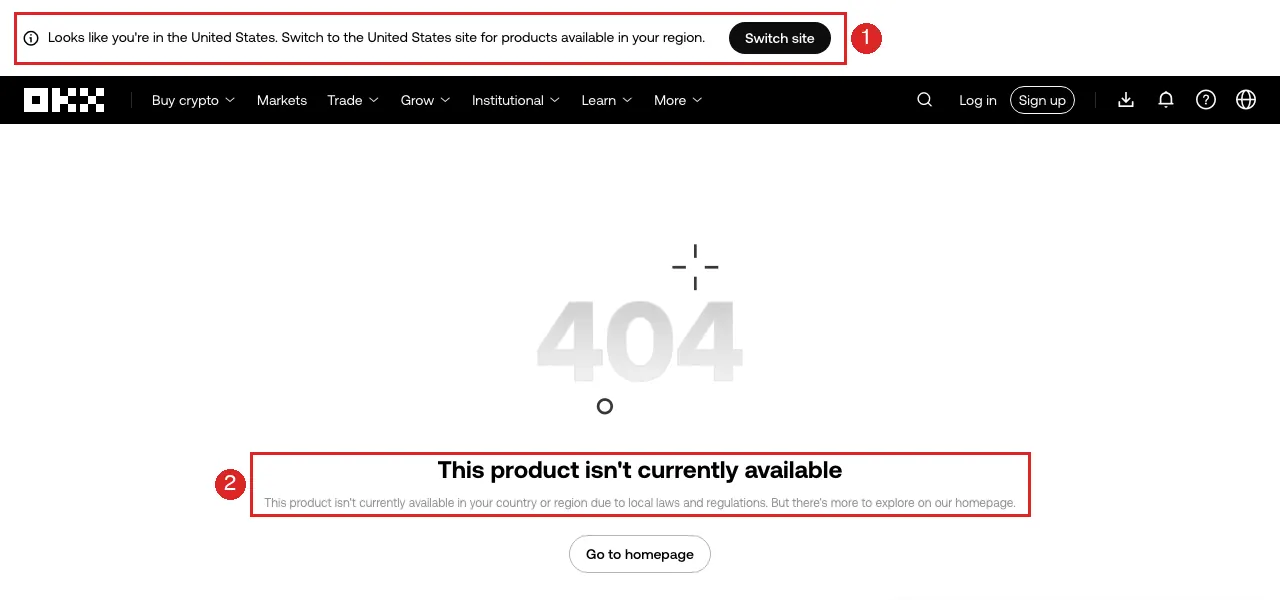
Don't use a VPN or choose a different country to get around this. Identity verification checks your document against the country you chose, so a mismatch fails verification, and accounts in restricted locations can be limited later.
How to sign up for OKX step by step
These steps follow OKX's own registration guide; the web and app flows are the same.
- Open the OKX sign-up page (or a referral link) and select your location. OKX pre-fills the country from your IP address, so open the menu and pick where you actually live, then tap Next.
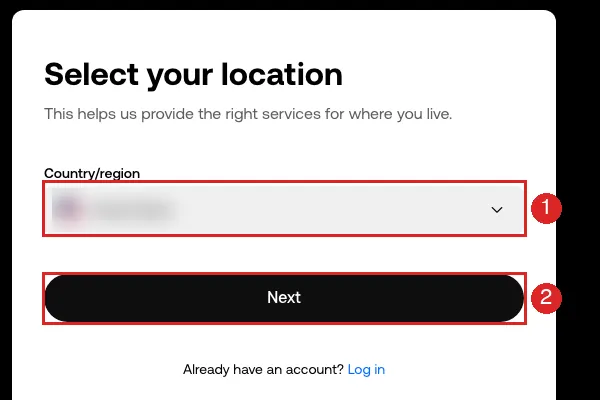
- Read and accept the terms for your region, then tap Create account.
- Enter your email address. Below it, expand Referral code (optional) and check the code. If you came from a referral link it is already filled in; otherwise type or paste it.
- Tap Sign up and enter the email verification code.
- Add your phone number with the correct country code and enter the SMS code to finish.
- Set up the login method the app asks for, then go to identity verification.
Where to enter the OKX referral code
The referral code goes in the "Referral code (optional)" field on the email step — before you tap Sign up. The field is collapsed by default, so it's easy to skip.
OKX's referral program FAQ is explicit about timing: the referral relationship is recorded when your friend signs up through a referral link or enters a valid code during sign-up, and "the referral code must be applied before sign-up is completed; it can't be added afterwards."
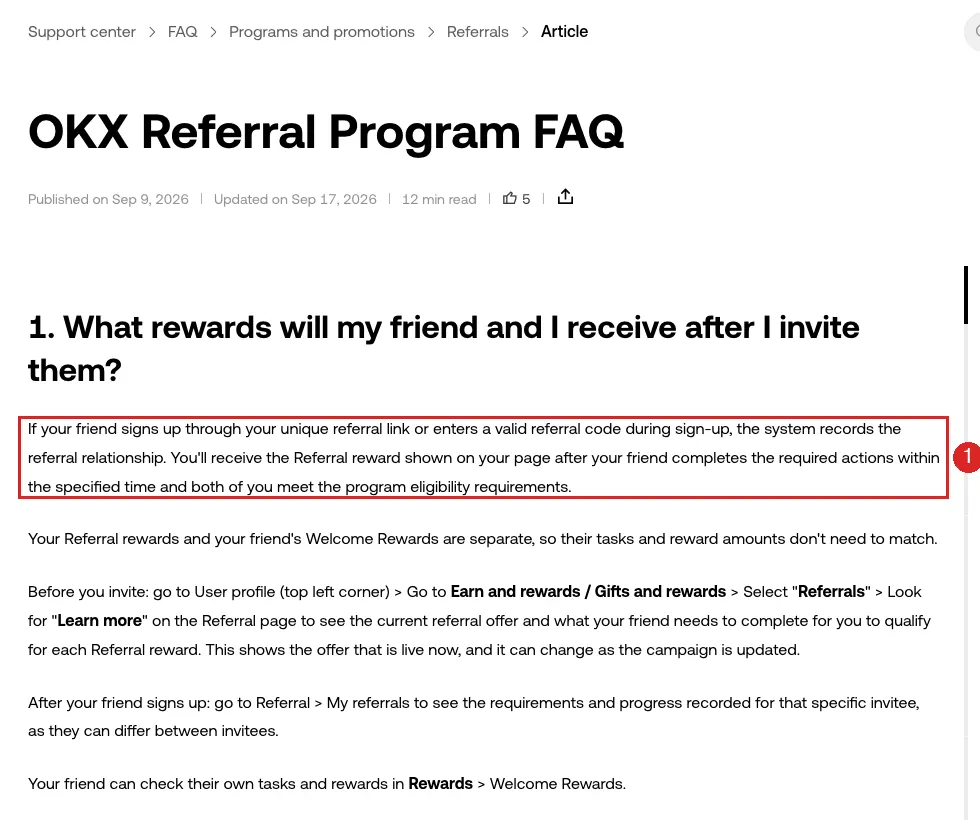
The surest way is to open a referral link: the code is filled in for you, and you only need to check it's there before tapping Sign up. Our OKX referral code and sign-up link are on the OKX referral code and fees page.
A few other rules from the same FAQ:
- The invitee has to complete identity verification and the required tasks within the time limit for the welcome rewards.
- Both people must use main accounts and meet the program requirements for their market. If the inviter and the new user are in different regions, rewards only apply when the program supports cross-region referrals.
- Registering several accounts, or using someone else's account or identity, breaks the rules.
Signed up without a referral code? What you can do
If you've already finished registering without a code:
- You can't add it in settings. OKX says the referral relationship "usually can't be added or changed" once registration is complete. There is no field for it in your profile.
- Deleting the account and registering again doesn't fix it. OKX states that doing so doesn't restore the referral relationship, referral eligibility or new-user bonus eligibility. Your email and phone number may also be tied to the old account.
- Don't open a second account. One email and one phone number per account is the rule, and multiple accounts break the referral program terms.
- Ignore anyone offering to "bind" a code for you. Third parties can't change OKX's records, and these offers often aim to get your login details.
- Check what you still qualify for. Campaigns that don't depend on a referral are open to you once you're verified, such as Jumpstart, Simple Earn promotions and OKX trading competitions.
If you're still on the sign-up form, go back to the email step and expand the referral code field before tapping Sign up.
Common OKX sign-up errors and how to fix them
| What you see | Likely cause | What to do |
|---|---|---|
| Verification code never arrives (email) | Filtered to spam or junk | Check spam; whitelist [email protected], [email protected], [email protected] and [email protected], then resend |
| Verification code never arrives (SMS) | Carrier delay, blocked SMS, full inbox | Restart the phone, turn off SMS-filtering apps, clear old messages; codes are valid for 10 minutes |
| "SMS sending failed" | Too many attempts | Wait about 2 hours before trying again, or use voice, Telegram or WhatsApp where offered |
| Email or phone already registered | Each can be used for one account only | Log in or reset the password on the existing account instead of signing up again |
| Referral code not accepted | Typo, extra space, or the code doesn't apply in your region | Open the referral link so the code is filled in; check there are no spaces |
| "This product isn't currently available in your country or region" | The product isn't offered by the OKX entity for your location | Use the site OKX suggests for your region; don't bypass with a VPN |
| "Looks like you're in…" banner | Your connection is in a different country from the site you opened | Switch to the site for the country you live in |
| Sign-up fails with no clear message | Network or wrong code | OKX suggests rechecking the email, phone and codes and using a stable connection |
The verification code fixes come from OKX's help article "Why haven't I received the verification code?". If nothing works, contact OKX support with your app version, the email address or phone number, and when you requested the code.
Identity verification and common failures
- Confirm your country or region and enter your name and date of birth exactly as on your ID.
- Photograph or upload the ID — sharp, no glare, all four corners visible.
- Complete the face check.
- Wait for review, usually quick; if it fails, fix the stated reason and resubmit.
| Common reason | Fix |
|---|---|
| Blurry or glaring photo | Retake it flat in even light |
| Details don't match the ID | Re-enter exactly as printed |
| Country and document don't match | Check residence vs issuing country; a passport often helps |
| Face check failed | Use the phone app, face the camera, remove glasses and hat |
Fiat deposits, P2P, withdrawals and most campaigns including Jumpstart require verification. For referral welcome rewards, verification also has to be done within the program's time limit.
Funding account vs Trading account
- Funding account: P2P purchases, withdrawals, and Jumpstart stakes and rewards usually go through here.
- Trading account: the balance used for spot and futures orders.
- Where deposits land: the deposit page has a "deposit to" option for Funding or Trading — check it before depositing.
If an order says "insufficient balance", the funds are probably in the Funding account — make a transfer on the assets page. For futures, note the account mode; beginners should start with the default.
Choosing an account mode
OKX trading accounts have several modes that decide which products you can trade and how margin works (names as shown in the app):
| Mode | Who it suits | What it means |
|---|---|---|
| Spot mode | Beginners trading spot only | No futures; the simplest |
| Futures mode (single-currency margin) | Starting with futures | Margin per currency, clear risk boundaries |
| Multi-currency margin | Experienced users with several assets | Assets combined as margin, better capital use |
| Portfolio margin | Large accounts running hedges | Margin based on whole-portfolio risk; most complex |
Start with spot or single-currency margin, and move on only once you understand liquidation and margin — see perpetual futures basics. Futures may not be available in your region at all (see the restricted services above).
App vs web sign-up
The flow is the same; the face check is usually smoother on the app. Only install it from OKX's website or official app stores — in some regions the store listing belongs to a local OKX entity, so follow the link from the official site. A referral link opened on your phone carries the code into the sign-up form either way; check the field before tapping Sign up.
Security settings to turn on first
- Authenticator 2FA, with the key backed up.
- Anti-phishing code to tell real emails from fake ones.
- Withdrawal address whitelist.
- Fund password, required for withdrawals and other sensitive actions.
- Device review: remove any logged-in device you don't recognise.
Your first purchase, end to end
- Buy USDT on P2P; it lands in the Funding account.
- Tap "Transfer" on the assets page and move the USDT to the Trading account.
- Open spot trading and search the pair (e.g. BTC/USDT); choose limit or market.
- A filled limit order pays the maker rate; a market order fills immediately at the taker rate.
- The coins sit in the Trading account; move long-term holdings back to Funding or into Simple Earn for interest.
Run through the whole flow with a small amount first.
What to do next
- Fund the account with P2P — see how to buy USDT with P2P.
- Watch Jumpstart, OKX's token launch platform where you stake OKB to mine new tokens — see the Jumpstart guide.
- Learn the fees: regular-user spot fees are 0.08% maker and 0.1% taker.
More in the OKX fees guide. If you also use Binance, compare the same coin's funding on both in the funding rate table, and see how to transfer from Binance to OKX.
FAQ
Where do I enter an OKX referral code?
In the "Referral code (optional)" field on the email step of sign-up, before you tap Sign up. The field is collapsed by default; a referral link fills it in for you.
Can I add an OKX referral code after signing up?
No. OKX says the code must be applied before sign-up is completed and can't be added afterwards. Deleting the account and signing up again doesn't restore referral or new-user bonus eligibility.
Why does OKX say my referral code is invalid?
Usually a typo or an extra space. Open the referral link instead so the code is filled in automatically. Referral rewards also depend on your region, so a code may not apply where you live.
I'm not receiving the OKX verification code — what should I do?
For email, check spam and whitelist OKX's mailer addresses. For SMS, restart the phone and turn off SMS filters; after "SMS sending failed", wait about 2 hours. Each code is valid for 10 minutes.
Can I use OKX in the United States?
US residents are served by OKX Inc., a separate US company with fewer products, and some US jurisdictions and all US territories are restricted. Products such as Jumpstart on the global site aren't offered there.
I chose the wrong country — can I change it?
The country or region decides which entity serves you and usually can't be changed yourself after registration; contact support. Choose truthfully at sign-up.
My deposit arrived but my trading balance is zero — why?
P2P purchases usually land in the Funding account, and on-chain deposits go to whichever account you chose on the deposit page. Transfer to the Trading account before placing orders.
Is OKX the same as 欧易?
Yes. 欧易 is OKX's Chinese name; it's the same platform.
Can I use OKX without verification?
Only a very limited set of features. Deposits, withdrawals and most campaigns require identity verification.
OKX or Binance first?
Many people use both. See the full Binance vs OKX comparison and the Binance sign-up guide.