How to Sign Up for Binance: Referral Code, KYC Verification and New-User Rewards (2026)
Step-by-step Binance registration with screenshots — web and app sign-up, where to enter the referral code, what KYC needs and why it fails, the security settings to turn on first, and what to do right after signing up.
On this page
Creating a Binance account takes a few minutes, but a few things can only be done right at sign-up: the referral code has to be entered before you submit, your verification details must match your ID exactly, and security settings are best done on day one. This guide follows the real order of steps with screenshots from the official site, then covers what to do once you're in and how to pay less in fees.
Four things to check first
- Your region: Binance does not serve residents of restricted regions such as mainland China and the United States, and some countries are served by a separate local entity with different features. Check the restricted list in the Binance terms of use and follow local law.
- ID: verification needs a valid national ID card, passport or driving licence, plus a working front camera for the face check. Your name and date of birth are matched against the document.
- Email or phone: an email address used only for exchanges keeps phishing mail separate from your everyday inbox.
- Official site only: register from the official Binance website or app. "Binance" links in search ads and social posts can be lookalike sites — check the domain, and only install the app from official stores or the Binance website.
Signing up on the web
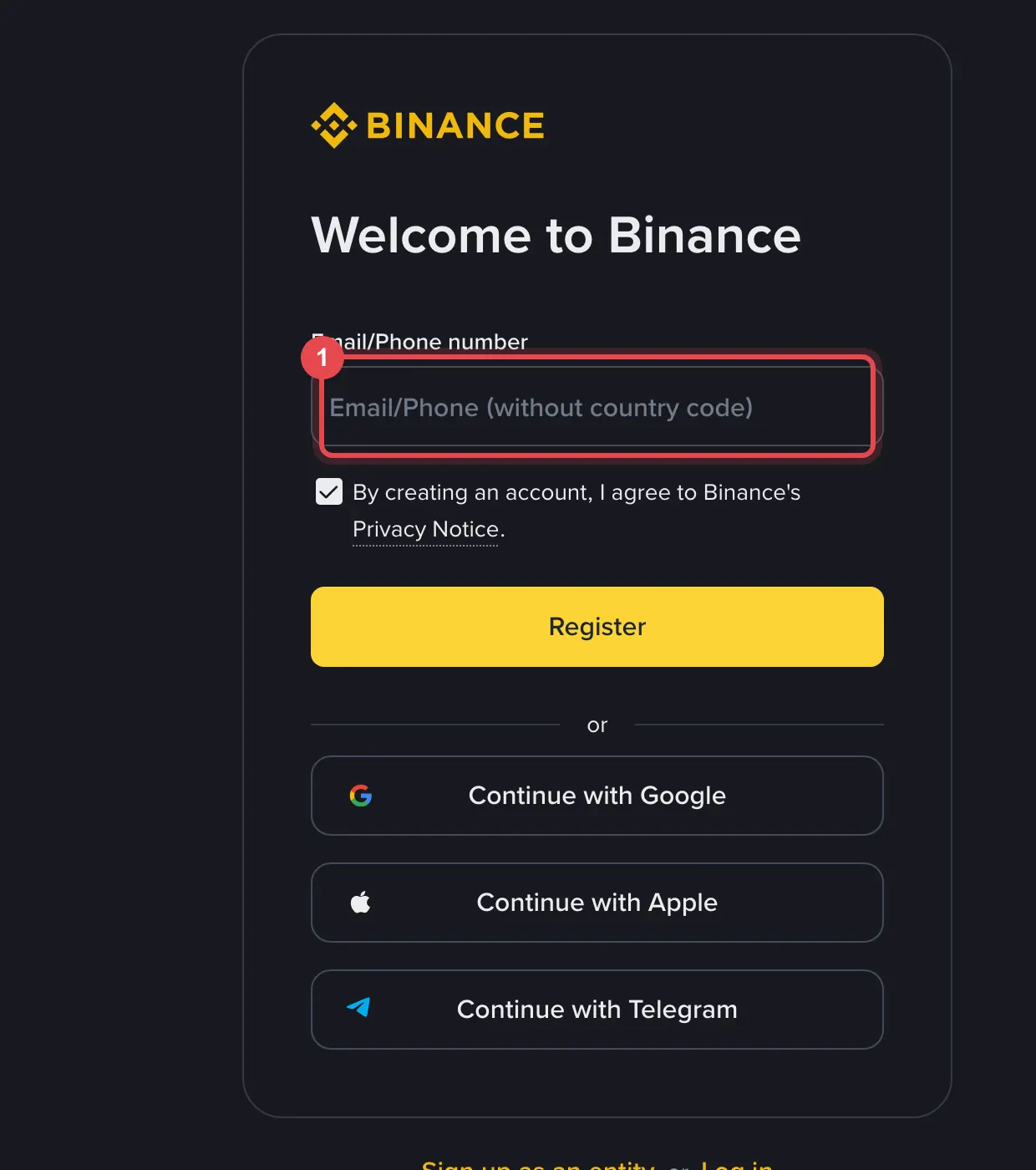
- Open the Binance sign-up page and enter your email or phone number. Pick the country code separately; don't type it into the number.
- Accept the terms and privacy notice and click "Sign up".
- Enter the 6-digit code sent by email or SMS. If it doesn't arrive, check spam; codes expire, so request a new one if needed.
- Set a password you don't use anywhere else — a password manager can generate a random 12+ character one.
- Confirm the referral ID: opened from a referral link, the field is pre-filled; otherwise enter it in "Referral ID (optional)" during sign-up. Check it isn't empty before you submit.
- Continue to identity verification when prompted.
Quick sign-up with Google, Apple or Telegram is shorter but works the same way — confirm the referral ID during that flow too.
How the app differs
The app flow is the same: open the app → Sign up → email or phone → code → password. Two differences:
- Where the referral field sits: on the app it's usually on the email screen or the next step — don't skip past it.
- Smoother face check: verification photographs your ID and face, which usually goes faster on a phone than with a laptop camera.
The referral code: where, why, and can you add it later
- Where: the "Referral ID (optional)" field during sign-up, pre-filled when you use a referral link.
- Why: referred users can in some cases receive a fee rebate or welcome rewards, as shown on the sign-up page. Using a code never increases your fees.
- Later? Usually not. The referral is set at registration and normally can't be added or changed afterwards.
Our referral code and sign-up link are on the Binance referral and fees page.
KYC verification and why it fails
Verification is required for fiat deposits, P2P, withdrawals and almost every campaign. Basic verification:
- Choose your nationality and country of residence, then enter your name, date of birth and address exactly as on your ID (including middle names and spacing).
- Upload photos of the front and back of the ID: even light, all four corners, no glare or cover.
- Complete the face check — follow the prompts, no hat or sunglasses, plain background.
- Wait for review: usually minutes to a few hours, longer at busy times.
If verification fails, the reason is shown. The common ones:
| Reason | Fix |
|---|---|
| Blurry, glaring or cropped ID photo | Retake it flat in even light; don't use screenshots or photos of a screen |
| Name or date of birth doesn't match | Re-enter exactly as printed, minding order and spacing |
| Face check failed | Remove glasses and hat, face the camera, use the phone app |
| Document type or country not supported | Use a passport or check the supported documents for your country |
| Residence in a restricted region | Verification isn't possible; follow local law |
Never borrow or lend an identity for verification — it breaks the terms of use and can get the account and its funds frozen.
Security settings to turn on first
- Authenticator app 2FA: safer than SMS. Back up the key or unbind before changing phones.
- Anti-phishing code: genuine Binance emails will include this phrase; delete any that don't.
- Withdrawal whitelist: withdrawals only go to addresses you added in advance. For moving coins, see how to transfer from Binance to OKX.
- Passkeys: on supported devices you can log in with fingerprint or face, reducing password theft risk.
- Device review: check logged-in devices and IPs in the security centre and remove anything unfamiliar.
What to do after signing up
1. Fund the account
The usual route is buying USDT via P2P: pick a payment method and merchant, pay, and the merchant releases the coins. See how to buy USDT with P2P for choosing merchants and avoiding scams. Some regions also allow direct card purchases.
2. Turn on the BNB fee discount
Regular-user spot fees are 0.1% maker and 0.1% taker; paying with BNB saves another 25%.
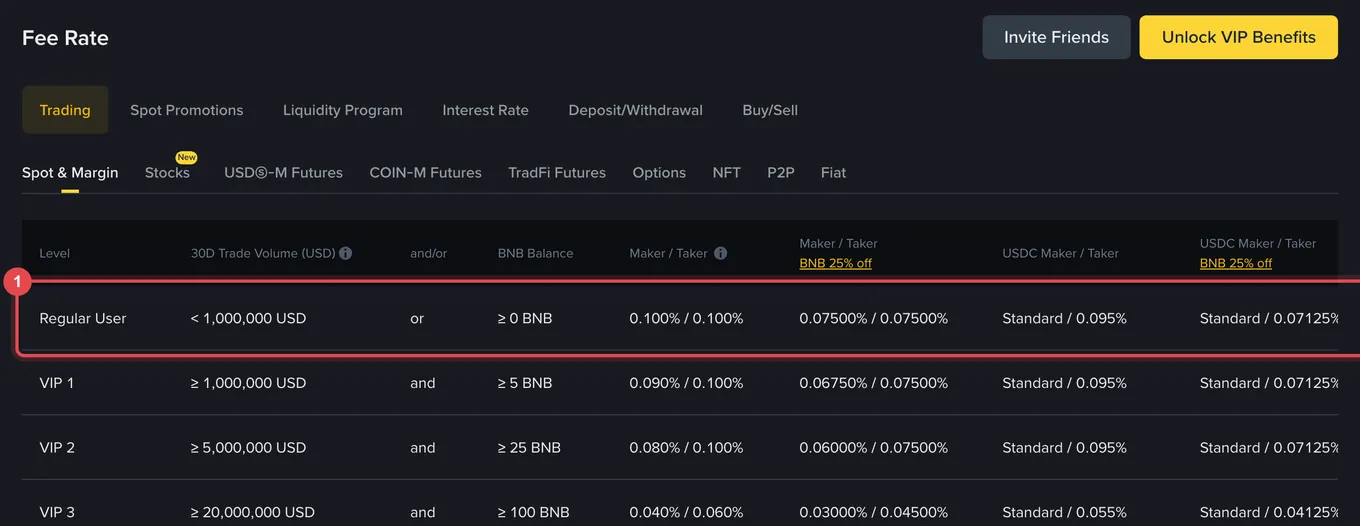
How fees are calculated, VIP tiers and other savings are in the Binance fees guide.
3. Get HODLer Airdrops passively
Subscribe BNB to Simple Earn (flexible or locked) and you receive HODLer Airdrops automatically before each token lists. Recent rounds:
| Announced | Campaign | Reward pool | Period |
|---|---|---|---|
| Jun 30, 2026 | Introducing OpenGradient (OPG) on Binance HODLer Airdrops | 6,400,000 OPG | Jun 22 – Jun 24 |
| May 29, 2026 | Introducing Genius Terminal (GENIUS) on Binance HODLer Airdrops | 10,000,000 GENIUS | May 11 – May 13 |
| May 21, 2026 | Introducing Gensyn (AIGENSYN) on Binance HODLer Airdrops | 100,000,000 AIGENSYN | May 4 – May 6 |
| Apr 28, 2026 | Introducing USD.AI (CHIP) on Binance HODLer Airdrops | 25,000,000 CHIP | Apr 13 – Apr 15 |
The full mechanics are in the Launchpool and HODLer Airdrops guide.
4. Watch the new-user offers
Binance regularly runs new-user deposit and trading tasks and boosted earn rates, many only valid for a while after registration. Live ones are on new-user rewards; the rules are explained in the new-user rewards guide.
FAQ
Where do I enter a Binance referral code?
In the "Referral ID (optional)" field during sign-up. A referral link fills it in — make sure it isn't empty before you submit.
Can I add a referral code after registering?
Usually not. The referral relationship is only set at registration.
I'm not receiving the verification code — what now?
For email, check spam and promotions folders; for SMS, check the country code and any SMS blocking. Wait a minute before resending — repeated requests can be rate-limited.
My identity verification keeps failing — what now?
Check the stated reason and fix it using the table above. Most failures are photo quality or details that don't match the ID. Contact support if it keeps failing.
How many Binance accounts can one person have?
One identity can normally verify one main account. To separate funds, use sub-accounts under the main account.
Can US residents sign up for Binance?
Not for Binance.com — the United States is a restricted region. This site does not forward visitors from restricted regions to sign-up pages.
Binance or OKX first?
If you want "free new token" campaigns such as Launchpool and HODLer Airdrops, start with Binance; for an on-chain wallet or futures, OKX is a good first choice. Holding both is fine — see Binance vs OKX and the OKX sign-up guide.